


How to post pic's in posts


Thread Starter
Registered User
Joined: Apr 2005
Posts: 5,485
From: Temecula, CA
How to post pic's in posts
I'm bored right now and I was going through my photobucket account and noticed I had all the screenshots for this writeup already made so I figured I'd give this a go to help future ZDriver members.
Posting an Image in a post.
The first thing you need to do if you want to share your own pics is create a photosharing account online. A popular one is www.photobucket.com (and this will be the method I show). Another popular one is using the pics off of your cardomain page (if you have one). Of course there are many different photosharing sites out there so search around if you dont want to use those one of those two.
So once you've created a photobucket account you'll need to upload pics off of your computer. To do this go to your photobucket album (you can create sub-folders to upload pics into but I wont get into that) and find the Image Upload area. Click Browse.
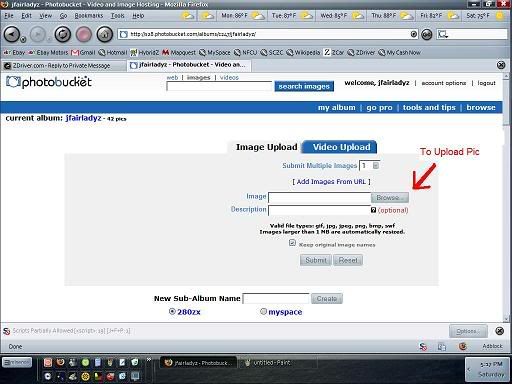
That will bring up a folder from your computers hard drive.
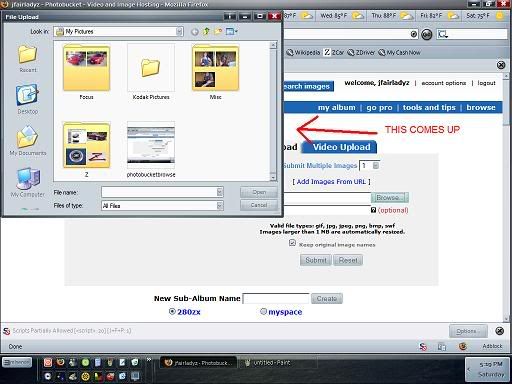
Navigate to the picture you want to upload. Select the picture and click Open
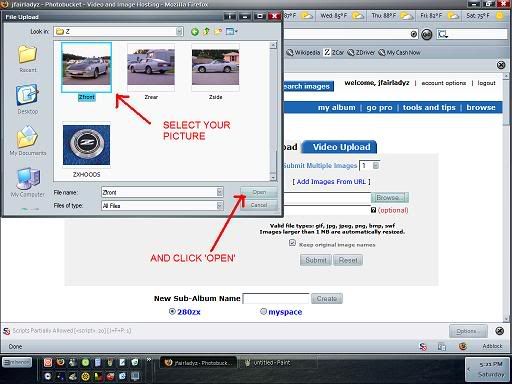
This will take you back to Photobucket. Click Submit.
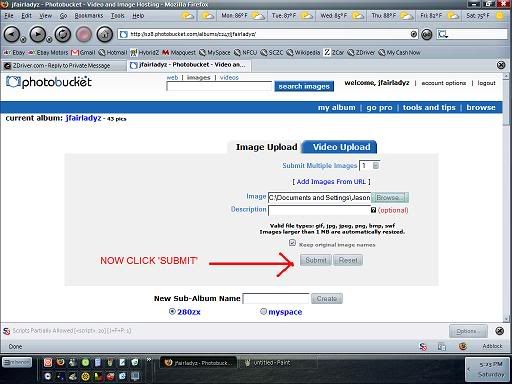
Once the pic has uploaded you can navigate down to your uploaded pictures. Find the picture you want to post in the thread and highlight the IMG text field. Right click it and choose copy.
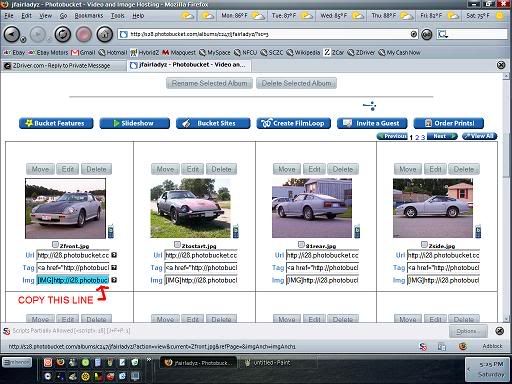
Then go to post you wan to make on ZDriver and right click a blank text field area and select paste. Then click submit when you've finished the post.
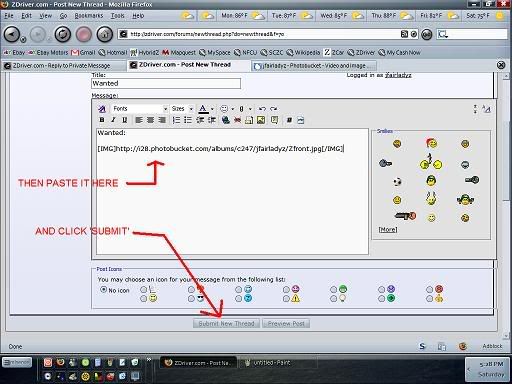
When all is said and done the post will come up something like this:

There is a preview post option next to the submit button so you can see if your IMG link works or not.
Also, if you dont have the luxury of copying and pasting with the IMG tags intact like with photobucket you can add the IMG tags manually. To do this you simply add [img] to the front of a particular picture URL and [/img] at the end of the URL. For example, if you have a picture you want to put in a post thats available online, such as your cardomain page, you would right click the picture and select Copy Image Location. Paste this link into your post and then add the IMG tags as I described to the link and voila!, a picture comes up in your post instead of the link text.
There is also the option of using the Insert Image option in the New Thread/Advanced Thread area. It is directly above the text field in the form of a square yellow box with a gray mountain and sun. Click that and you can paste in your pictures URL there and it will automatically add the IMG tags.
Posting an Image in a post.
The first thing you need to do if you want to share your own pics is create a photosharing account online. A popular one is www.photobucket.com (and this will be the method I show). Another popular one is using the pics off of your cardomain page (if you have one). Of course there are many different photosharing sites out there so search around if you dont want to use those one of those two.
So once you've created a photobucket account you'll need to upload pics off of your computer. To do this go to your photobucket album (you can create sub-folders to upload pics into but I wont get into that) and find the Image Upload area. Click Browse.
That will bring up a folder from your computers hard drive.
Navigate to the picture you want to upload. Select the picture and click Open
This will take you back to Photobucket. Click Submit.
Once the pic has uploaded you can navigate down to your uploaded pictures. Find the picture you want to post in the thread and highlight the IMG text field. Right click it and choose copy.
Then go to post you wan to make on ZDriver and right click a blank text field area and select paste. Then click submit when you've finished the post.
When all is said and done the post will come up something like this:
There is a preview post option next to the submit button so you can see if your IMG link works or not.
Also, if you dont have the luxury of copying and pasting with the IMG tags intact like with photobucket you can add the IMG tags manually. To do this you simply add [img] to the front of a particular picture URL and [/img] at the end of the URL. For example, if you have a picture you want to put in a post thats available online, such as your cardomain page, you would right click the picture and select Copy Image Location. Paste this link into your post and then add the IMG tags as I described to the link and voila!, a picture comes up in your post instead of the link text.
There is also the option of using the Insert Image option in the New Thread/Advanced Thread area. It is directly above the text field in the form of a square yellow box with a gray mountain and sun. Click that and you can paste in your pictures URL there and it will automatically add the IMG tags.





Haterade by da gallon!
Joined: Jun 2008
Posts: 2,306
From: Valdosta GA
photobucket is where its at, you don't even have to go through the whole insert pic link button thing, just copy image code and paste(it even copies it for you so all you really have to do is paste) 

The Cake Is A Lie!
Joined: May 2003
Posts: 5,690
From: WA
Originally Posted by 280zx2by2
photobucket is where its at, you don't even have to go through the whole insert pic link button thing, just copy image code and paste(it even copies it for you so all you really have to do is paste)

Registered User
Joined: Jul 2008
Posts: 414
From: Cincinnati, OH

Help, I set up a photobucket account and up loaded a few photos. I can't copy them though. I use windows and do not get the same images as above.
How do I get the photo from photo bucket to ZDriver?
Is there another way besides photoshop or it's competitors? I didn't get the IMG thing.
How do I get the photo from photo bucket to ZDriver?
Is there another way besides photoshop or it's competitors? I didn't get the IMG thing.



Thread
Thread Starter
Forum
Replies
Last Post
Bookmarks


